Author Blocks
Author blocks look like this:
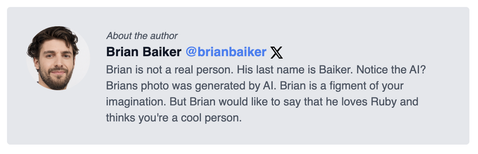
This is powered by the author front matter key. This key aligns with a value in the data/authors.yml file.
If this key is missing from the blog post frontmatter (more info), the blog post will not have an author block.
Here are two examples from the demo (scroll to the bottom of each link):
Authors Data File
In this file you specify the authors of the blog, their name, avatar and bio.
Here’s an example with a couple of authors in a sample authors.yml file.
- brianbaiker:
  name: Brian Baiker
  photo: /images/authors/brianbaiker.jpg
  bio: Brian is not a real person. His last name is Baiker. Notice the AI? Brians photo was generated by AI. Brian is a figment of your imagination. But Brian would like to say that he loves Ruby and thinks you're a cool person.
  social_media:
    x: brianbaiker
- janesmith:
  name: Jane Smith
  photo: /images/authors/janesmith.jpg
  bio: Aenean eu leo quam. Pellentesque ornare sem lacinia quam venenatis vestibulum.
  social_media:
    x:
If the X handle is provided it will be rendered in author block with a link to their X profile. If the X handle is omitted it will not be rendered.
You can add more social media profiles and helpers as best suites you and your site.